最後更新:2026年9月10日
第1週 導論
1. 建立倉庫並啟動 Codespace
- 註冊 GitHub 帳號。
- 請到 keyreg.qhchina.org 領取你的 API 金鑰(課程代碼:chi3242)。
- 前往模板倉庫 https://github.com/mcjkurz/qh-starter,按 Use this template,建立你自己的倉庫(不要直接在模板上改)。
- 進入你剛建立的倉庫,按 Code → Codespaces → Create codespace。首次啟動需數分鐘,以完成套件安裝。
2. 連接 OpenCode
請使用你在註冊時取得的 API 金鑰。不要把金鑰寫進倉庫,也不要與他人分享。
- 在 Codespace 終端機輸入
opencode並按 Enter。 - 輸入
/connect並按 Enter。 - 搜尋並選擇 OpenRouter。
- 按提示貼上你在註冊時取得的 API 金鑰。
- 輸入
/models並按 Enter。 - 選擇 GLM-5.3-Flash。
3. 課堂練習
將下列提示完整複製,貼進 OpenCode:
提示 1
The 红楼梦 novel is already in this folder as a .txt file.
jieba, qhchina, numpy, matplotlib, and scikit-learn are already installed; do not create a virtual environment.

In the root folder, create a Python script (.py) that:
- loads that file and splits it into 120 chapters (each chapter starts with 第 and a Chinese numeral), for example:

第一回  甄士隐梦幻识通灵 贾雨村风尘怀闺秀
第八十五回  贾存周报升郎中任 薛文起复惹放流刑
第一一八回  记微嫌舅兄欺弱女 惊谜语妻妾谏痴人

- tokenizes each chapter with jieba, removing punctuation marks
- finds the 300 most common words in the novel
- calculates a z-score for each of those word frequencies in each chapter
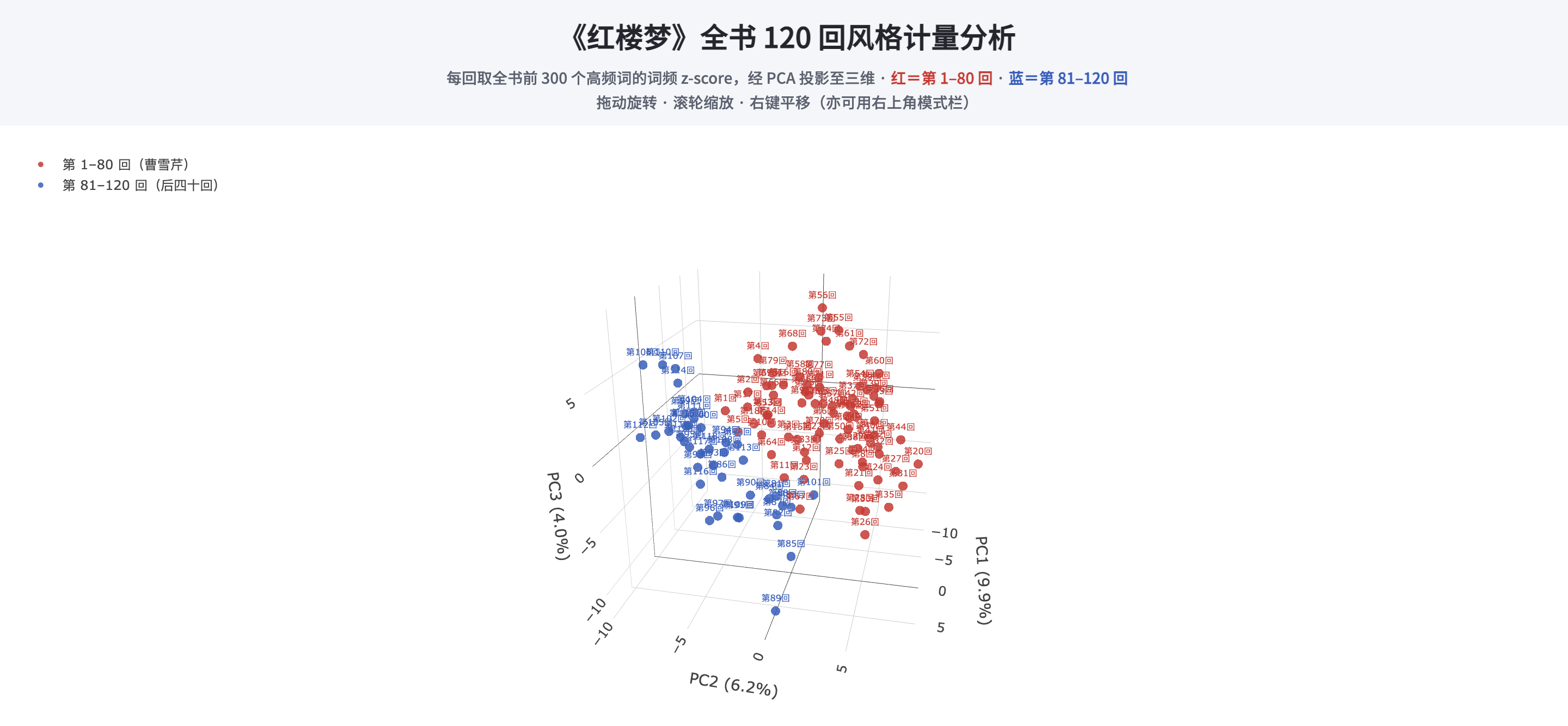
- projects the chapter vectors into 3D with PCA
- colors chapters 1–80 red and 81–120 blue
- imports qhchina and calls load_fonts()
- saves a .png
完成後,檢查結果:在左側檔案列表中點開 .png 檔。
確認無誤後,再把下列提示貼進 OpenCode:
提示 2
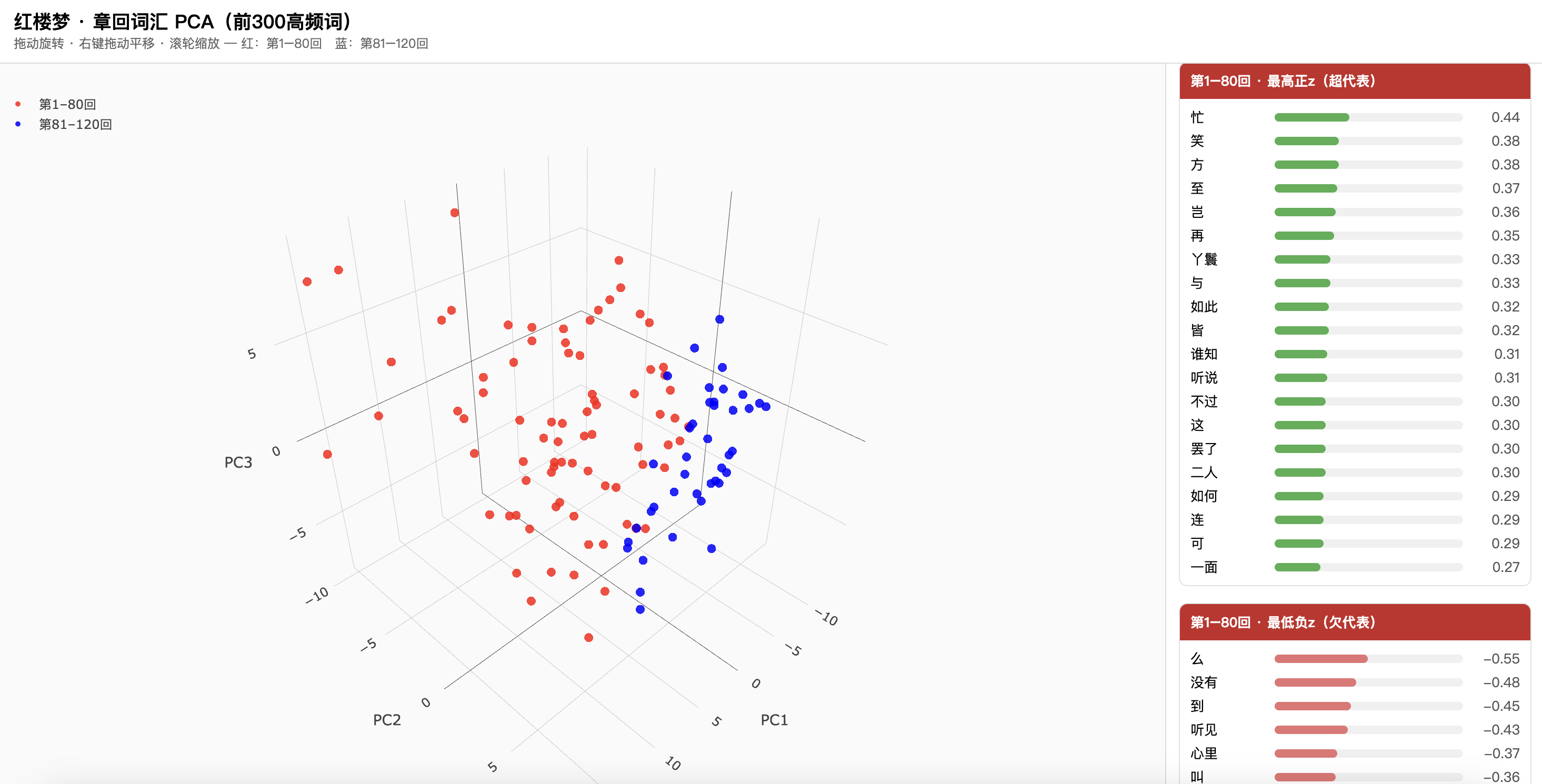
Create an HTML page that lets me rotate and move that 3D PCA projection.
The page should also show the top 20 positive features and the top 20 negative features
for the first 80 chapters and for the last 40 chapters. Use plotly (already installed).
完成後,Codespace 裡多半打不開這個 HTML。在左側檔案上按右鍵,選 Download,下載到自己的電腦,再用瀏覽器打開。若一切順利,你應看到類似下面的結果:可旋轉的三維投影,以及前八十回與後四十回的正負特徵詞。也可以直接打開這個互動示例。
4. 儲存到 GitHub
請把結果提交(commit)並推送(push)到你的倉庫。關閉瀏覽器或停止 Codespace,檔案不會立刻消失:GitHub 會在 Codespace 閒置若干天後才自動刪除;在此之前,未提交的修改與檔案都會保留。不過 Codespace 一旦被刪除,尚未推送到倉庫的內容就無法找回,因此做完練習後仍應 commit 並 push。
三種做法任選其一:
- 左側按鈕:點左側的 Source Control(分支圖示)。先在訊息框寫一句說明(例如
first commit),再按 Commit。然後按 Push 或 Sync Changes。 - 終端機:若仍在 OpenCode 中,先輸入
/exit離開,再在 Codespace 終端機執行:git add -A git commit -m "first commit" git push
- 交給編程助手:在 OpenCode 裡直接請它幫你 commit 並 push。將下列提示完整複製,貼進 OpenCode:
提示 3
Commit all changes with the message "first commit", then push to GitHub.
5. 另一條路:用自己的電腦
上面走的是瀏覽器裡的 Codespace。若你比較喜歡在自己的電腦上做,練習內容完全一樣,只是環境改成本機。
- 先完成第 1 節的前三步:GitHub 帳號、API 金鑰、用模板建立自己的倉庫。
- 安裝 Python 與 VS Code。
- 依這頁說明安裝 OpenCode(裝完後要開一個新終端機,或重新讀取 shell 設定,指令才找得到)。
- 把倉庫下載下來:在 GitHub 倉庫頁按綠色 Code,複製網址,在 VS Code 終端機執行
git clone 網址;也可以按 Download ZIP 下載並解壓。 - 在 VS Code 選 File → Open Folder,打開這個資料夾。
- 選 Terminal → New Terminal,輸入
opencode,再依上面第 2 節連接 OpenRouter、選模型。 - 課堂練習與提交步驟與上面相同。本機第一次跑程式時,若提示缺少套件,可請 OpenCode 幫你安裝。